

Laser cutting is only one part of a sheet-metal production cycle. Before a sheet reaches the cutting bed, someone or something must identify the right material, retrieve it, separate it from the stack and load it safely. After cutting, parts and the remaining skeleton must be removed, sorted and routed to the next operation.
An automated sheet-metal laser cutting line connects some or all of these steps. The objective is not automation for its own sake; it is to make material flow more predictable and reduce avoidable waiting, manual handling or work-in-process. Whether that improves a particular factory depends on its product mix, schedule, staffing, layout and downstream capacity.
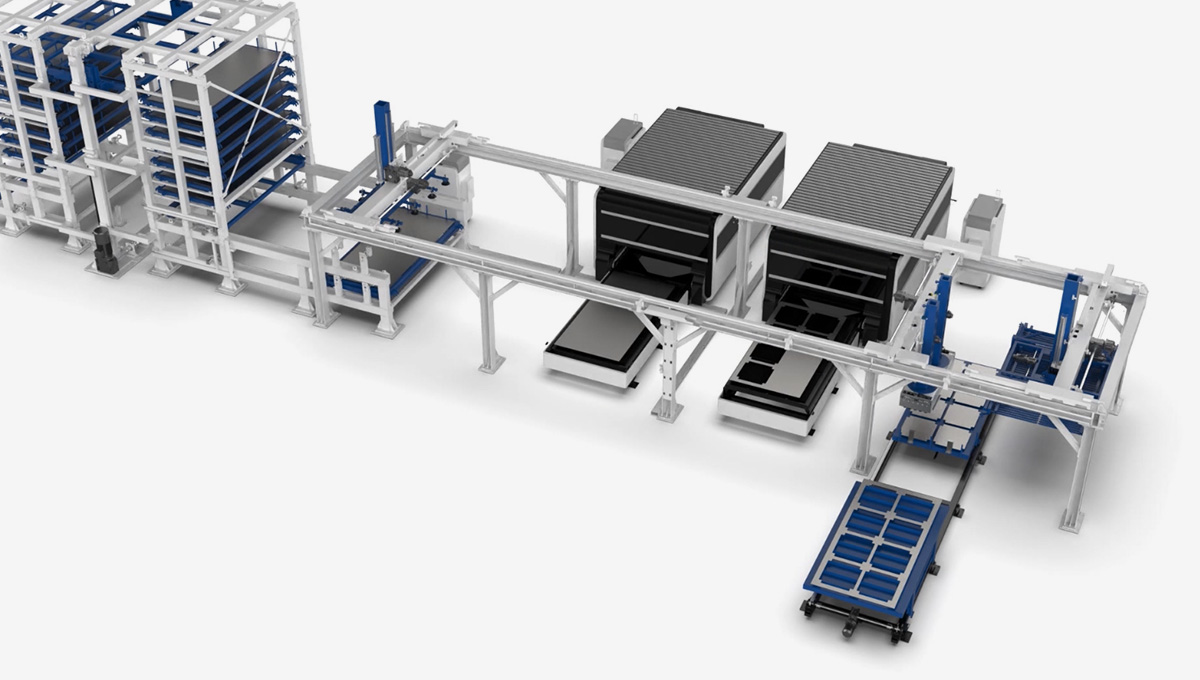
The Workflow: From Sheet Storage to Sorted Parts
A connected line is easier to assess when each handoff is made explicit. A typical material flow can include the following stages; the exact sequence and level of automation vary by installation.
- Store and identify sheet stock. Sheets are organized by material, thickness, format or job. The storage plan needs to reflect real inventory rules, not just the maximum number of storage positions.
- Select the next material. A job schedule or operator instruction identifies which sheet is needed. If the line receives orders from ERP or MES, define how job IDs, material codes and status updates are exchanged.
- Retrieve and load the sheet. A handling system moves the selected sheet toward the cutter. Sheet dimensions, weight, surface condition, stack separation and thickness all affect handling feasibility.
- Cut the nest. The laser processes the programmed layout. Actual cutting time depends on the material, thickness, geometry, pierce count, cutting parameters and production program—not simply the machine’s maximum travel speed.
- Unload and separate output. Depending on the configured system, finished parts may be separated from the skeleton and sent to designated locations. Part geometry, small cutouts, tabs, mixed nests and the required sorting logic should be tested.
- Manage remnants and scrap. Decide whether reusable remnants are returned to stock, labeled and tracked, or removed from the process. Define where scrap goes and who is responsible when automatic separation is incomplete.
- Close the production loop. Confirm what the line reports back: job start and completion, material consumption, alarms, machine state, part counts or other agreed data. “ERP/MES interface” should become a documented interface specification and test plan.
For factories still comparing cutter platforms, start with the sheet metal laser cutting machine range. For an existing exchange-table cutter, first quantify how much time is lost specifically to pallet loading and unloading; an exchange table and a storage-and-sorting line solve different scopes of the material-flow problem.
How a Dual-Tower System Fits into the Line
A vertical magazine can buffer multiple sheet types in a smaller floor area than a broad horizontal storage arrangement. In a dual-tower configuration, material is stored in layers and retrieved for loading. GWEIKE describes its system as a shared loading system that can serve two laser cutters, with automatic loading, cutting, finished-part sorting and scrap unloading presented as parts of the broader workflow.
That architecture can be useful when a shop wants to reduce manual sheet movement, keep cutters supplied across changing jobs, or centralize stock near more than one machine. It does not remove the need to plan traffic lanes, replenishment, operator access, remnant handling, maintenance access or downstream part flow.
Video note: this is a product/process visualization, not a customer case study or a timed production-capacity test. It should not be used as evidence of a specific cycle time, uptime, labor reduction or output guarantee.
Measure the Bottleneck Before Choosing Automation
Collect a representative sample of production rather than relying on a best-case demonstration. For each job or sheet, record the time spent cutting, loading, unloading, exchanging, sorting, waiting for a person or material, and handling exceptions. Include normal changeovers and interruptions; keep abnormal breakdowns in a separate category so the baseline is transparent.
| Measure | What to record | Why it matters |
|---|---|---|
| Cut cycle | Program start to completion, by representative material, thickness and nest | Shows whether laser processing or handling dominates the sheet cycle |
| Material handling | Retrieval, separation, loading, alignment and unloading time | Indicates which manual tasks automation could realistically affect |
| Waiting and blocking | Machine waiting for a sheet; loader waiting for a machine; output waiting for sorting | Reveals whether the bottleneck moves upstream or downstream after automation |
| Product mix | Sheets per shift, material changes, thickness changes, nests and order frequency | Tests whether the proposed storage and scheduling pattern matches real demand |
| Downstream flow | Part separation, deburring, bending, inspection and packing capacity | Prevents cutting output from accumulating as work-in-process |
Use the records to compare the current process with a proposed sequence. Any throughput estimate should state its assumptions: available shifts, planned maintenance, job mix, operator tasks, loader dispatch rules, sorting completion and downstream constraints. The existing exchange-table cycle-time guide provides a narrower worksheet for cutter handling and pallet swaps; this article addresses the broader storage-to-sorting flow and should not be treated as a second ROI calculator.
Published Dual-Tower Configuration Data to Verify
The figures below are transcribed from the GWEIKE dual-tower product page. They describe published product references, not a promise that every figure applies simultaneously to every order. Confirm final limits, inclusions and interfaces against the selected machine, material and signed technical agreement.
| Published item | Reference shown online | What to confirm in the project |
|---|---|---|
| Storage architecture | Two towers; 8 layers per tower, 16 total; up to 3 t per layer | Rated load basis, usable layer dimensions, allowable load distribution and tower layout |
| Stored sheet format | From 1200 × 1000 mm to 3000 × 1500 mm; larger/custom sizes may be configurable | Actual sheet tolerances, material-specific handling limits and selected cutter format |
| Robot handling thickness | 0.8–5 mm listed for robot loading/unloading | Material, sheet flatness, surface protection, separation method and any exceptions |
| Robot payload | Maximum robot load capacity: 300 kg | Payload at the specified reach, gripper/tool weight, acceleration and safety margin |
| Cutting machine table | Maximum worktable load capacity: 1300 kg | Do not confuse the table rating with tower layer load or robot payload |
| Cutting format and exchange | Maximum processing area 3050 × 1530 mm (customizable); worktable exchange time 15 s | Selected machine model, measured exchange conditions and full sheet-cycle time |
| Laser and motion references | Compatible laser power 1500–20000 W; max traverse 120 m/min; max acceleration 2G | Final cutter model, process window and material-specific cutting result |
| Magazine utilities | 42 kW total power consumption; 0.6–0.7 MPa air source; 380 V, 3-phase, 5-wire | Whether figures cover the full selected cell; local electrical standards and final utility drawings |
| Factory-system connection | Standard ERP/MES interfaces are stated | Protocol, data fields, software scope, network/security requirements and integration ownership |
Keep ratings in their proper context: the page lists a 3-ton storage-layer capacity, a 300 kg robot payload, and a 1300 kg cutting-table load. These values describe different components and are not interchangeable. Similarly, a 15-second table exchange is not the same as total time to retrieve, separate, load, cut, sort and clear a sheet.
Planning Checklist for a Sheet-Metal Automation Project
Before requesting a proposal, assemble one concise application package. It helps the engineering team test feasibility and makes competing proposals easier to compare.
| Area | Information to provide | Questions to resolve |
|---|---|---|
| Materials | Alloys, grades, thicknesses, sheet sizes, protective films and surface conditions | Which materials and sizes must be stored and automatically handled? |
| Demand | Representative nests, sheets per shift, order mix, shift pattern and changeovers | What is the required output, and how is it measured? |
| Existing process | Cutter models, current loading method, cycle logs, downtime categories and staffing | Where is the measured constraint today? |
| Part flow | Part sizes, skeletons, scrap, remnant rules and next operations | What is automatically separated, and what remains a manual task? |
| Layout | CAD/floor plan, columns, doors, crane/forklift routes, aisle and maintenance clearances | Can stock replenishment and safe operator access coexist with the cell? |
| Controls | Job data, ERP/MES vendor, network policy and desired status/consumption fields | Who supplies, maps and tests each interface? |
| Acceptance | Sample parts, material, nests, operators, utilities and agreed test scenarios | What measurable criteria define successful handoff and production readiness? |
Ask for an acceptance plan, not just a feature list
- Run representative material and nests, including the difficult sheet or part that normally causes handling problems.
- Demonstrate retrieval, sheet separation, loading, cutter handoff, finished-part handling, scrap/remnant decisions and recovery from a defined interruption.
- Record cycle boundaries and clarify whether quoted times include operator actions, replenishment, sorting, planned stops and exception recovery.
- Test each agreed ERP/MES message and document ownership for errors, manual overrides and restart procedures.
- Review final drawings, guarding, emergency stops, access points, maintenance isolation and operator training before sign-off.
Safety and Site Planning for North American and European Projects
Automation changes how people interact with a cell; it does not remove the need to assess hazards around moving towers, sheet edges, transfer equipment, pinch points, laser equipment, electrical and pneumatic energy, maintenance access and material replenishment. Define safeguarded areas, access gates, interlocks, emergency-stop coverage, safe recovery steps and training with the integrator and the site safety team.
For U.S. workplaces, OSHA’s 29 CFR 1910.212 machine-guarding requirements address protection from machine hazards. OSHA’s 29 CFR 1910.147 addresses hazardous-energy control during covered servicing and maintenance. Applicability and implementation depend on the equipment and work activity; have the employer and qualified safety personnel review the cell-specific procedures.
For EU projects, Regulation (EU) 2023/1230 on machinery is scheduled to apply from 20 January 2027. Before placing machinery on the market or putting it into service, confirm the applicable conformity route and responsibilities for the complete integrated line—not only the individual cutter—with the manufacturer, integrator and importer. See the official EUR-Lex text of Regulation (EU) 2023/1230. This article is operational planning guidance, not legal advice or a substitute for a risk assessment.
For preliminary shop preparation, the fiber laser cutter installation checklist covers site access, utilities and installation topics for selected GA configurations. A dual-tower cell has additional footprint, load, access and utility considerations; use the final project drawings and model-specific manuals rather than transferring checklist values without review.
Where This Type of Line May Fit
GWEIKE lists sheet-metal processing, steel structures, engineering machinery, elevators, cabinets and enclosures, rail transportation, kitchenware and automotive manufacturing as application areas for its dual-tower line. These industries share a need to move sheet stock through cutting, but their parts, traceability needs, order patterns and downstream workflows differ substantially.
A cabinet shop with frequent material changes may prioritize flexible retrieval and labeling. A high-volume component producer may focus on stable nests, scheduled replenishment and sorting rules. A job shop may need the line to handle a wide range of sheet formats without creating excessive remnant inventory. Treat these as planning scenarios, not claims that one configuration is suitable for every facility in an industry.
Explore the broader fiber laser cutting machine range or review the dual-tower production line configuration with your material and layout data.
Frequently Asked Questions
What does an automated sheet-metal laser cutting line include?
Depending on the project, it can connect sheet storage, material selection and loading, laser cutting, finished-part and skeleton handling, sorting, and production-system communication. The exact scope varies by configuration.
Does a dual-tower system automatically double output?
No. A shared loading system can serve two cutters, but realized output depends on cutting mix, handling cycles, machine availability, sorting, downstream operations and scheduling. Validate the complete process with measured production data.
What sheet sizes and thicknesses does the published GWEIKE system support?
The published dual-tower page lists stored sheet sizes from 1200 by 1000 mm to 3000 by 1500 mm and a robot loading and unloading thickness range of 0.8 to 5 mm. Confirm the final limits for the selected material, machine and configuration.
Can the line connect to ERP or MES?
The published page says standard ERP and MES interfaces are supported. Confirm the interface scope, data fields, responsibilities and acceptance tests for the specific project.
What should I prepare before requesting a line proposal?
Prepare material and sheet specifications, monthly product mix, nesting and order patterns, current cycle and waiting-time records, machine models, floor layout, sorting requirements, utilities, safety expectations and any ERP or MES interface requirements.
Is the online video a production-capacity test?
No. The linked video is a product/process visualization. It does not establish a customer-specific cycle time, uptime, yield or throughput guarantee.
References and Related Reading
- GWEIKE Dual-Tower Magazine Intelligent Production Line — published workflow and configuration references.
- GWEIKE Sheet Metal Laser Cutting Machine range — cutter platform overview.
- Exchange-table cycle-time and selection guide — related but narrower handling topic.
- Fiber laser cutter installation checklist — preliminary site-readiness guidance; verify applicability to the integrated line.
- OSHA 29 CFR 1910.212, OSHA 29 CFR 1910.147, and EU Regulation 2023/1230.
Planning an automated cutting cell?
Share your sheet formats, material and thickness range, representative nests, current cycle observations, existing cutter models, floor layout and sorting requirements. Those inputs make a configuration discussion far more useful than machine specifications alone.
Discuss Your Application View the Dual-Tower System