

Executive summary
- Airflow wins. Strong air assist + effective exhaust remove smoke, suppress flames, and reduce edge darkening.
- Focus is non-negotiable. Even slight defocus increases heat-affected zone and makes edges darker and wider.
- Wood is not “one material.” Density, moisture, resin, and (for plywood/MDF) adhesive/binder chemistry change results.
- Use a test grid, not guesswork. Ten minutes of structured tuning prevents hours of rework and scrap.
- Consistency is a process. Presets + optics cleaning + stable cooling keep outputs repeatable across shifts.
Watch: How to Laser Cut Wood (CO₂)
A practical walkthrough of setup, airflow, focus, and cut quality control.
This guide is written for professional CO₂ systems and production realities. It shows how to set up a repeatable workflow, how to manage wood variability, how to dial in parameters quickly, and how to troubleshoot the common failures that cause wasted sheets and schedule delays.
Why CO₂ lasers are the gold standard for wood
In professional shops, CO₂ lasers are the default choice for wood because they are optimized for non-metal processing: wood, acrylic, MDF, leather, and other organic or polymer-based materials. The result is a reliable combination of fast cutting, clean engraving contrast, and a practical ecosystem of fixtures, tables, and workflows.
| Laser type | Where it excels | Wood cutting reality |
|---|---|---|
| CO₂ laser | Non-metals: wood, acrylic, MDF, leather | Best overall for professional wood cutting + engraving workflows |
| Diode laser | Entry-level engraving, light cutting | Can cut thin wood, but slower and often with more edge darkening on thicker stock |
| Fiber laser | Metals and industrial marking | Not the primary tool for wood cutting; typically chosen for metal work |

Important: CO₂ “capability” is not only a wattage number. Two systems with the same rated tube power can produce different wood results because of airflow, optical alignment, focus routine, table design, and exhaust efficiency. In other words, quality is a system outcome.
What actually happens when a laser cuts wood
Wood is a biological composite: cellulose fibers, lignin, moisture, resins, and (in engineered boards) adhesives and binders. Laser cutting works by concentrating energy into a narrow kerf. In the kerf, wood decomposes and vaporizes; adjacent material sees heat and smoke, creating what operators call the “burned edge” or smoke staining.
Why edges darken
- Excess heat dwell: moving too slowly or adding passes without sufficient airflow keeps temperature high at the edge.
- Smoke trapped in the cut: weak air assist allows hot gases to linger and re-char the kerf walls.
- Smoke recirculation: insufficient exhaust lets smoke wash across the surface, especially on light woods.
- Focus drift: warped sheets or skipped focus checks widen the effective beam and increase the heat-affected zone.
- Underside flashback: table reflections and poor airflow beneath the sheet can mark the backside.
Why plywood is “unfair” compared to solid wood
Plywood introduces glue lines that can char differently than the veneers. Some glue systems cut cleanly; others generate heavier smoke, darker edges, and localized flare-ups. If your shop cuts plywood daily, the difference between “good plywood” and “random plywood” is the difference between stable production and constant troubleshooting.
Material selection: plywood, MDF, hardwoods, and batch control
Plywood: the most common, the most variable
Birch and basswood plywood are popular for signage, crafts, kits, and furniture components because they balance strength, flatness, and availability. The key risk is variability: glue chemistry, veneer density, internal voids, and moisture content can change cut behavior sheet-to-sheet.
- Source for repeatability: use the same supplier, grade, and thickness for production runs.
- Batch discipline: treat every new batch as a new material until it passes a quick test grid.
- Inspect flatness: warped sheets create focus drift across the bed and inconsistent edge quality.
MDF/HDF: uniform geometry, heavier smoke load
MDF is often easier to keep dimensionally consistent because it is uniform. This can be excellent for tight-fit parts and repeatable kerf. The trade-off is smoke and resin load: MDF can deposit more contamination on optics and stress your exhaust/filtration system. If your MDF quality drifts mid-week, optics cleanliness and exhaust performance are common root causes.
Hardwoods: premium look, density and oils matter
Hardwood species (oak, walnut, cherry, maple) can cut beautifully, but density increases energy requirements at the same thickness. Some species are oilier or resin-rich and may flare more easily. Strong air assist and reliable supervision are critical. In professional settings, hardwood cutting success is often driven by disciplined parameter tuning and stable airflow rather than “more power.”
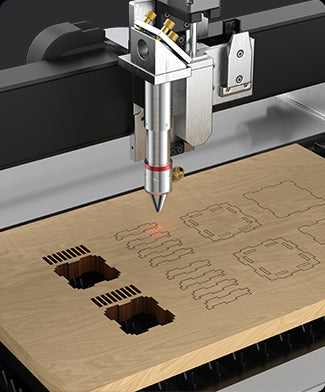
A practical “laser-ready wood” checklist
- Flatness: minimal warp to keep focus stable across the full job area.
- Moisture stability: store material in a controlled environment; avoid “cold-to-hot” condensation on sheets.
- Known binders: for plywood/MDF, know what you’re cutting and plan ventilation accordingly.
- Clean surfaces: dust and residue increase staining and fire risk.
- Documented batch info: supplier + date + grade + thickness should be recorded for repeatable presets.
Machine selection for production: bed size, power, Z, airflow, duty cycle
Machine selection should map to the job you run weekly, not the most extreme job you might run once a quarter. Professional CO₂ selection is a structured decision across five dimensions: format , thickness window , setup repeatability , airflow and smoke management , and duty cycle stability .
Bed size and handling time
A larger bed is not only about maximum part size. It reduces handling by letting you nest more parts per setup. If your operation is high-volume signage or furniture components, bed size becomes a throughput multiplier.
Tube power and the practical thickness window
Higher tube power expands the practical thickness window and allows higher speed at the same thickness. However, wattage does not automatically yield cleaner edges. Clean edges are mostly an airflow + focus outcome. Think of tube power as “capacity,” and airflow/focus as “finish quality control.”
Z-lift and focus automation
If your workflow switches between 3 mm, 6 mm, 9 mm, and 12 mm stock, Z-lift and focus convenience matter. The fastest way to create inconsistent results is to skip focus checks during thickness changes. Systems that simplify Z changes reduce operator error and reduce scrap.

Exhaust and filtration planning
Wood cutting is a smoke-and-particulate process. A professional setup includes effective exhaust routing and, where required, filtration stages appropriate to your shop environment. Smoke control is not only about comfort; it reduces surface staining, helps maintain optics, and supports stable quality during long production shifts.
The professional workflow: step-by-step from file to finished parts
Professional wood cutting is a repeatable workflow. When quality breaks, it is usually because one step was skipped: airflow not confirmed, focus not checked, material batch not validated, or optics too dirty to transmit consistent energy. Use the workflow below as an SOP template.
Phase A — Pre-flight checks (2 minutes that save hours)
- Ventilation on: confirm exhaust is running and air paths are clear.
- Air assist on: verify air is actually reaching the cut zone.
- Bed clean: remove debris and small offcuts (reduces smoke and fire risk).
- Optics condition: if yesterday was MDF-heavy, assume optics need inspection.
- Material flatness: check for warp; plan pins or hold-down as needed.
Phase B — File preparation (accuracy begins here)
- Separate layers: engrave first, then score, then cut.
- Eliminate duplicate vectors: double-cut lines are a common cause of excessive burn.
- Use lead-ins/lead-outs (when appropriate): reduce edge marks at the start/stop point on visible contours.
- Nesting strategy: optimize spacing to reduce heat buildup and minimize warp or smoke accumulation in dense nests.
Phase C — Setup (table, focus, and fixtures)
- Choose the table: honeycomb for thin sheets and small parts; knife/slats for cut-through and thicker stock.
- Focus: treat focus like calibration. Any thickness change requires a focus check.
- Hold-down (as needed): pins, weights, or jigs reduce focus drift from warp.
Phase D — Validate with a small test coupon
Before you commit a full sheet, cut a small test coupon from the same batch (especially plywood). Confirm cut-through, edge appearance, underside marking, and kerf behavior on a joint or slot geometry. Save the resulting parameters as a named preset.
Phase E — First-article inspection (FAI)
In production, treat the first part as a test artifact. Inspect the visible edges, joint fit, and surface staining. If the FAI is not correct, stop and tune immediately. Cutting an entire nest with “almost-correct” settings is how scrap happens.
Kerf control and dimensional accuracy (press-fit and joints)
Kerf is the material removed by the cut. In wood, kerf is not only a geometric number—it is a quality indicator. If kerf grows, edges may be darker, joints may become loose, and fine details may wash out. Professional shops measure kerf and design around it rather than guessing.
How to measure kerf reliably
- Cut a calibration shape: for example, a 20 mm square and a matching 20 mm hole or slot.
- Measure with calipers: measure the cut part and the hole/slot.
- Compute effective kerf: use the difference to estimate how much material is removed.
- Repeat across the bed (optional): if you suspect alignment or focus issues, test corners and center.
Kerf compensation for “Inner” vs “Outer” contours
For finger joints, press-fit kits, and tight tolerances, apply offsets to inner and outer vectors. The correct offset depends on the exact wood batch and your current optics/airflow condition. This is why batch notes and saved presets are essential for repeatable production.
Parameter tuning with a test grid (the method pros use)
There is no universal setting that works across all wood. The fastest path to the right settings is a structured test grid. A test grid turns tuning into a 10-minute procedure rather than a 2-hour guessing session.
The pro test-grid method
- Cut a coupon from the same sheet/batch you will run.
- Create a grid that varies speed on one axis and power on the other.
- Cut and inspect for: cut-through, edge color, underside marks, and joint fit.
- Select the best cell and validate with one real geometry (including joints).
- Save a preset with notes: wood type, thickness, supplier/batch, table type, air assist level, and date/optics condition.
Starting-point ranges (use as a baseline, not a guarantee)
The table below is intentionally framed as a starting-point reference for professional CO₂ workflows. Actual values vary with tube power, optics condition, air assist strength, exhaust effectiveness, and wood batch. Always validate with a test grid on your current stock.
| Material | Thickness | Strategy | What to optimize first |
|---|---|---|---|
| Birch/Basswood plywood | 3 mm | Single pass, higher speed | Minimize smoke staining; confirm cut-through without excessive darkening |
| Plywood | 6 mm | Single pass or 2-pass fast strategy | Control glue-line behavior; validate edges on both veneer and glue sections |
| MDF | 6–9 mm | Single pass with strong exhaust | Smoke management and optics contamination rate |
| Hardwood | 9–12 mm | Single pass if clean; otherwise multi-pass | Suppress flare-ups with air assist; maintain focus across the sheet |
Clean-edge tactics: char reduction and stain control
The most common production complaint in wood laser cutting is “burned edges.” Solving this consistently requires a hierarchy of controls: airflow and exhaust first, focus second, then parameter tuning, then cosmetic tactics like masking.
Technique 1 — Treat airflow as your primary quality control
- Air assist: increases kerf clearing and reduces flame intensity at the cut line.
- Exhaust: removes smoke before it deposits stain on the surface.
- Leak control: ensure your cabinet maintains predictable flow rather than recirculating smoke.
Technique 2 — Focus correctly, then keep it correct
A slight defocus widens the beam at the surface and increases the heat-affected zone. If you see edges darken over time, verify that focus routines are consistent across operators and shifts. If only one corner is dark, suspect sheet warp or bed debris causing localized focus error.
Technique 3 — Masking for cosmetic surfaces
Masking tape or transfer tape is an effective production tactic for visible faces on signage and premium products. The laser cuts through the mask, and smoke residue stays on the tape rather than staining the wood. This is especially valuable on light woods where staining is visually obvious.
Technique 4 — Reduce underside flashback
If the underside shows honeycomb marks, consider switching to knife/slats for cut-through jobs, increasing airflow under the sheet, and raising the sheet on pins where appropriate. Underside marks are often table/airflow issues rather than “bad settings.”
Technique 5 — Control cut order and heat accumulation
Dense nests can trap heat and smoke. A practical strategy is to:
- Engrave first, cut last (so parts do not shift before engraving finishes).
- Cut interior features before exterior outlines (so small details remain supported).
- Maintain adequate spacing between adjacent cuts to reduce local heat accumulation.
Production stability: SOPs, maintenance cadence, and drift prevention
Professional output depends on consistency. Even a perfectly tuned preset will drift if optics are contaminated, exhaust is restricted, cooling is unstable, or operator routines vary. This section is designed as a production checklist.
SOPs that pay for themselves
- Material intake SOP: record supplier/batch; verify flatness; store dry and flat.
- Preset SOP: name presets by material + thickness + table type + batch notes.
- Focus SOP: focus check at job start and after thickness changes.
- Airflow SOP: verify air assist and exhaust are active before enabling laser output.
- First-article SOP: inspect and approve before running full nests.
Daily maintenance cadence (typical)
- Bed cleaning: remove debris and offcuts to reduce smoke and fire risk.
- Optics inspection: check lens/mirrors for resin haze, especially after MDF or resin-heavy woods.
- Exhaust check: confirm airflow strength; look for blocked ducts or saturated filters.
- Quick verification cut: run a small coupon on the day’s primary stock to catch drift early.
Troubleshooting matrix: fast diagnosis
| Symptom | Most likely causes | High-value fixes |
|---|---|---|
| Not cutting through consistently | Focus drift, warped sheet, dirty optics, weak air assist, plywood glue variability | Refocus; flatten/fixture sheet; clean optics; increase air assist; test a faster multi-pass strategy; validate batch |
| Edges overly dark / heavy char | Too slow, weak exhaust, duplicate vectors, poor focus | Increase speed; strengthen exhaust; remove duplicate lines; verify focus; re-run a small test grid |
| Top surface smoke staining | Smoke recirculation, leaks, insufficient exhaust | Improve exhaust flow; reduce leaks; use masking on cosmetic faces; adjust cut order to reduce heat/smoke concentration |
| Underside marks (honeycomb/flashback) | Table reflection/contact, weak airflow under sheet | Switch to knife/slats; elevate on pins; improve under-sheet exhaust path; reduce dense cut clustering |
| Small flare-ups | Resin pockets, debris, heat dwell too high, low air assist | Increase air assist; increase speed; clean bed; supervise; stop immediately if flame persists; avoid leaving the machine unattended |
| Parts don’t fit (loose/tight joints) | Kerf not measured, material batch changed, drift in focus/optics | Measure kerf on current batch; adjust offsets; verify focus; clean optics; lock presets with batch notes |
Which GWEIKE CO₂ system fits your wood workflow?
The right machine depends on sheet size, throughput targets, and your typical thickness window. Use the mapping below as a starting point, then validate by running a small sample coupon on your actual wood stock.
| Your workflow | Recommended direction | Why it fits |
|---|---|---|
| Small studio, education, personalization, compact prototyping | STORM600 (600×400) | Compact format for non-metal cutting/engraving when you prioritize convenience and small-batch efficiency. |
| Compact shop switching thickness frequently (workflow convenience) | LG6040N (600×400) | Useful when your operation benefits from easier table movement/Z handling for varied stock. |
| Balanced production: signage, displays, workshop cutting | LC1390 (1300×900) | Classic mid-format choice when you want a larger working area for nests and repeated cutting jobs. |
| Production convenience for non-metals (daily throughput focus) | LC1390N | Production-oriented configuration when stability and setup repeatability matter in long-run operations. |
| Large sheet processing (furniture components, big signage panels) | LC1325D (1300×2500) | Large cutting area reduces handling time and increases nesting efficiency for bigger panels. |
| Mixed jobs (thin metal + non-metal) on one platform | LC1325M | For shops that want to consolidate non-metal wood work and thin-metal tasks in one workflow. |
Ready to validate on your own wood samples?
The most reliable way to lock expectations is to test your real wood stock (species, thickness, supplier batch) under your finishing standard. If you want guidance matching bed size and configuration to your production volume, reach out to the team.
FAQ
How do you laser cut wood cleanly without heavy burn marks?
Prioritize airflow and focus: strong air assist plus effective exhaust, correct focus across the sheet, and a short test grid to tune speed and power. For cosmetic surfaces, masking tape helps prevent smoke staining and makes cleanup faster.
Why does one plywood sheet cut perfectly and the next one chars?
Plywood varies by glue chemistry, veneer density, internal voids, and moisture. Even within the same supplier, different batches can behave differently. Run a quick test coupon for each new batch and save presets with batch notes.
Is a honeycomb bed always the best choice for wood?
Honeycomb supports thin sheets and small parts well, but can increase underside flashback marks on cut-through jobs. Knife/slat tables often reduce backside staining for thicker wood and full cut-through runs.
Should I use one pass or multiple passes for thick wood?
If a single slow pass creates heavy char, a faster multi-pass strategy can reduce heat dwell and often improves edge appearance—especially on thick stock or glue-variable plywood. Always validate with a test coupon before running full sheets.
What is the best way to ensure parts fit for finger joints or press-fit kits?
Measure kerf on the exact wood batch you will run, then apply inner/outer offsets in your design workflow. Re-check kerf when you change material supplier, thickness, table type, or when optics condition changes.
Can I run wood jobs unattended on a CO₂ laser?
No. Wood is combustible and flare-ups can occur. Professional operation requires supervision and a clear safety procedure for stopping a job and responding quickly.
Related Articles
Continue exploring CO₂ wood processing workflows and machine selection with these resources from GWEIKE.